 AppRank
스크린샷


설명
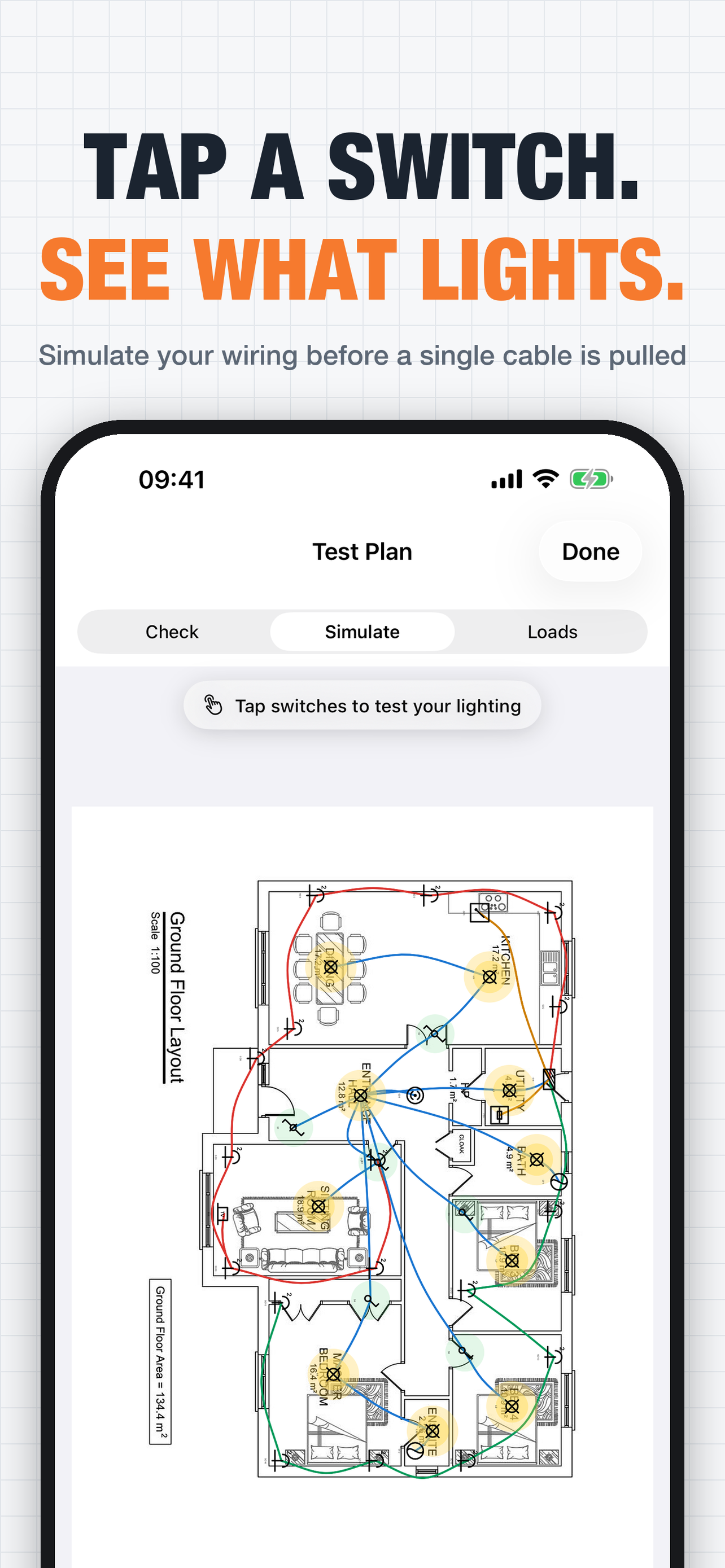
GET THE PLAN IN • Scan rooms in 3D with your camera and get the floor plan drawn for you (iPhone Pro or iPad Pro). • Take a photo of a paper drawing with the built-in document scanner. Scan several pages and each one becomes its own plan. • Or import a PDF, or a photo from your library or from Files. • No plan? Draw walls, doors and windows yourself. 70 SYMBOLS, DRAG AND DROP International (IEC 60617) or US symbols, your choice. • Power, switches, lighting: sockets, fused spurs, switches, dimmers, ceiling, wall, down and emergency lights. • Fire and security: smoke, heat and CO detectors, call points, sounders, motion sensors, cameras. • Data, heating, energy: data and TV outlets, Wi-Fi, heaters, heat pumps, EV chargers, solar. • Boards, isolators, meters, and a custom symbol you name yourself. • Drag one out of the palette and it lands under your finger. Rotate in 90° steps, add a label, circuit reference and notes, resize one symbol or the whole lot with a slider. RUN THE CIRCUITS • Tap a symbol, tap another, and a smooth curved run joins them. • Runs stay attached: move a socket and the wire moves with it. • Pick the circuit as you draw. Every circuit gets its own colour, and it is the same colour in the editor, in test and on the PDF. • Eraser mode, delete a symbol and its runs go with it, and undo/redo while you work. CHECK YOUR WORK • Check: traces the wiring out from every distribution board and flags anything unpowered or left dangling. • Simulate: tap switches on and off and see which lights come on. • Loads: per-circuit VA and amps against the breaker rating you set. These are indicative aids for catching mistakes on a drawing. They are not certified design or verification calculations, and they do not replace inspection, testing, certification or the wiring rules that apply to your job. LEGEND AND PDF • A legend of every symbol type and circuit used is built for you and added to every export. • Export an A4 PDF with a title block, the background, the runs and the symbols, or save the sheet as an image. BUILT FOR THE VAN • Lose signal mid-job and keep working. Changes save on the device and sync to your account when you are back in coverage. • iPhone: turn it sideways and the plan fills the screen, tools on side rails. • iPad: a symbol panel beside the plan. • Pinch to zoom in on a tight cupboard, pan around the rest. SHARE WITH THE CREW • Invite a teammate with an 8-character code and they can open and edit the project's plans on their own iPhone or iPad. WHO IT'S FOR Sole traders and crews doing domestic and commercial work: rewires, first fix, extensions, board changes, fit-outs. Anyone who has to hand a customer, a builder or a main contractor a drawing showing where the sockets, switches and lights actually went. QUESTIONS OR IDEAS Contact support or request a feature from the account menu. You get a fast reply, straight from the developer. Sign in with Apple or Google. You can delete your account and everything in it from inside the app at any time. SUBSCRIPTION EPlan Premium is a monthly, auto-renewing subscription. The price for your country is shown in the app before you buy. Premium gives you unlimited projects and plans, unlimited editing, team invites, the wiring test tools and watermark-free PDF export. Without a subscription you get one project with up to two plans, one editing session per plan (view-only after that), and PDF export with a watermark. Team invites and the test tools need Premium. Importing and scanning floorplans, including 3D room scans, is free. Payment is charged to your Apple Account when you confirm the purchase. It renews every month at the same price unless auto-renew is switched off at least 24 hours before the current period ends, and renewal is charged within 24 hours of that. Manage or cancel it in Settings > Apple Account > Subscriptions. Terms of Service: https://eplan-api.bodiud.workers.dev/terms Privacy Policy: https://eplan-api.bodiud.workers.dev/privacy
새로운 기능
버전 2.0 · 2026. 10. 5.• Now on iPad: a symbol panel beside the plan, a Rotate button for drawings that were scanned sideways, and room scanning on iPad Pro. • New: US electrical symbols. Choose international (IEC) or US symbols and names, in the editor or the account menu. • 70 symbols in nine groups, up from 18: fire alarm, security, data, heating, EV and solar, plus a custom symbol you name yourself. • New: draw the walls yourself. Tap corner to corner on a blank plan, add doors and windows, and see each wall's length as you go. • Scan Rooms is now free for everyone with an iPhone Pro or iPad Pro: walk the rooms and get the floor plan drawn for you. • Contact support or request a feature from the account menu. Messages go straight to the developer. • The app is now also available in German, French and Spanish.
정보
- 판매자
- David Bodiu
- 카테고리
- Graphics & Design
- 버전
- 2.0
- 필요 사양
- iOS 17.0+
- 크기
- 3.5 MB
- 연령 등급
- 4+