 AppRank
스크린샷


설명
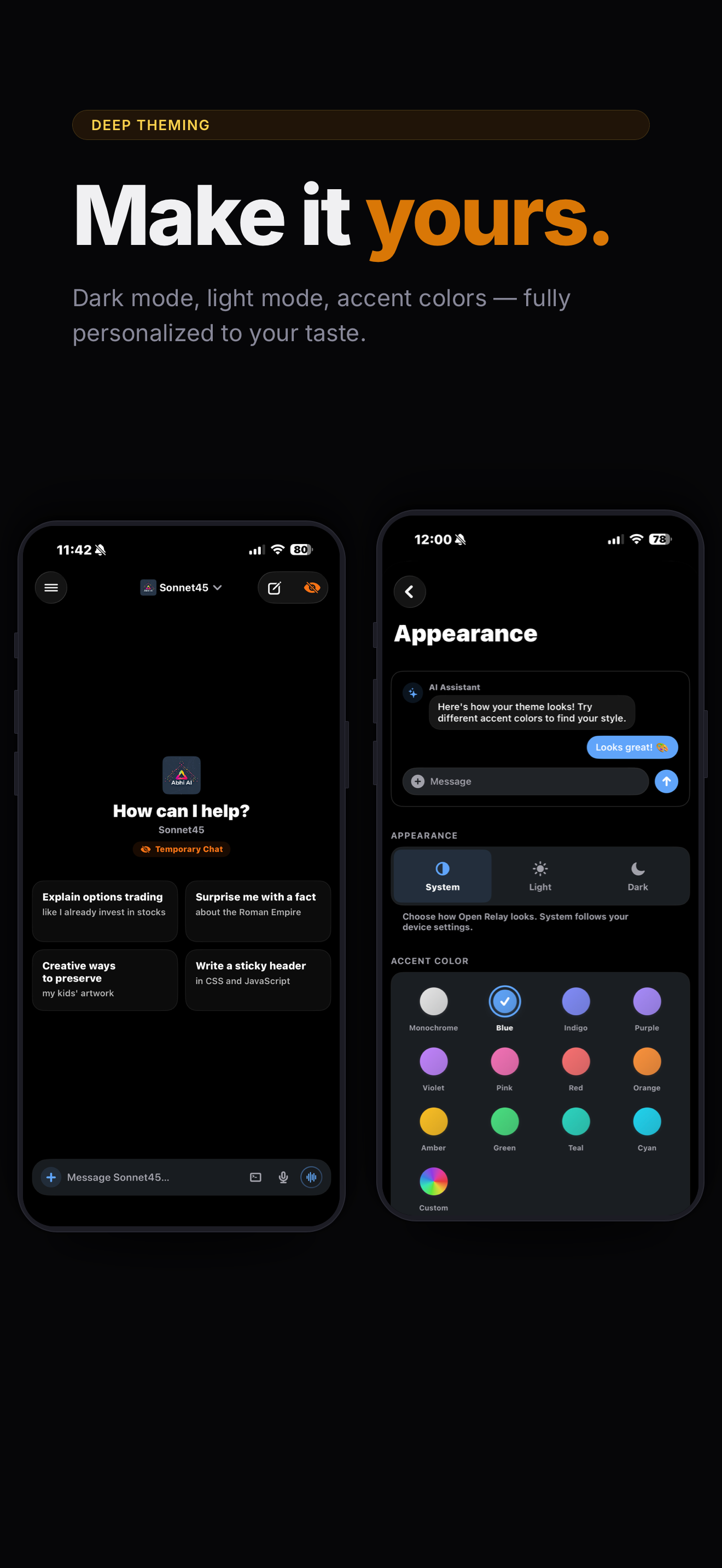
Your AI. Your server. Your pocket. Open Relay is a beautiful, 100% native iOS & iPadOS client for Open WebUI. Chat with any model on your server, right from your iPhone or iPad, with a fast, polished experience that feels native. — STREAMING CHAT WITH RICH MARKDOWN — Watch responses flow in word by word with full markdown rendering — syntax-highlighted code blocks, tables, math equations, Mermaid diagrams, inline SVG images, and more. Everything renders beautifully in real time. — VOICE CALLS WITH AI — Call your AI like you'd call a friend. Open Relay uses Apple's CallKit so it looks and feels like a real phone call — complete with an animated orb that reacts to your voice and the AI's response. — ADMIN CONSOLE — Take full control of your WebUI admin settings directly from the app instead of visiting the site. Directly add new integrations, mcp servers, or modify server settings quickly through the app. — TERMINAL INTEGRATION — Give your AI access to a real terminal. Enable command execution from chat, then swipe from the right edge to open a file browser with directory navigation, file upload, preview, and a mini terminal. — SWITCH MODELS ON THE FLY — Type @ to mention any model and switch mid-conversation. A persistent chip in the composer shows which model is active. — PROMPT LIBRARY & SKILLS — Type / to search your prompt library with slash commands, or $ to browse and apply your Open WebUI skills — all without leaving the composer. — KNOWLEDGE BASES (RAG) — Type # to search and attach your knowledge collections, folders, and files. Works exactly like the web UI. — ON-DEVICE VOICE, COMPLETELY PRIVATE — Built-in neural text-to-speech (Marvis) and speech-to-text run entirely on your device via Apple's MLX framework. Download once, then no data ever leaves your phone. Server-based and Apple system voices also supported. — TOOLS & WORKSPACE — Toggle server-side tools on or off per conversation. Tool calls render inline with collapsible details. Manage models, knowledge bases, prompts, skills, and tools directly from the app. — CHANNELS — Collaborative chat rooms where multiple users and AI models interact — organized by Direct Messages, Groups, and Channels. — AUTOMATIONS — Automations let you schedule prompts to run automatically at recurring times. — TASK MANAGEMENT — Task Management gives agentic models a structured way to plan and track multi-step work in a chat. — CALENDAR — Schedule, track, and manage events — with AI that can plan for you. — ORGANIZE EVERYTHING — Drag and drop chats into folders. Pin important conversations. Search across everything. Configure folders with system prompts, default models, and attached knowledge. Archive and restore in bulk. — RICH ATTACHMENTS — Attach files, photos, or paste images into chat. The Share Extension sends content from any app straight into a conversation. — DEEP THEMING — Accent color presets or a custom color wheel. Pure black OLED mode with tinted surfaces. Every change previews live. — MULTI-SERVER/ACCOUNT SUPPORT — Save multiple Open WebUI connections and switch instantly. Full auth support — username/password, LDAP, SSO, and auth proxies like Authelia and Authentik. — HOME SCREEN WIDGETS & SHORTCUTS — Start a chat from a widget or your Action Button. Background notifications alert you when a generation finishes while you're in another app. — ACCESSIBILITY — Independently adjust message text size, conversation title size, and UI element scaling Requires a running Open WebUI server instance. Your models Your rules!
새로운 기능
버전 6.0 · 2026. 9. 29.WHAT'S NEW • Introducing Apple Watch companion app — talk to your assistant without lifting your phone directly from your watch! Read and reply to your chats and channels, Ask with Siri ("Ask Open Relay…"), the Action button or Control Center, add Talk or your latest chat to your watch face and Smart Stack, get notified when a reply is ready, and hand off any chat to your iPhone. Check status in Settings → Apple Watch. • Sign in with passkeys through the system browser on self-hosted identity providers like Keycloak or Authentik (optional, under Advanced; requires server setup). • Reply to chat and channel notifications right from the notification, on iPhone or Apple Watch. • Files shown by terminal tools (videos, audio, images, documents) now appear as cards you can play, open, or save — nothing downloads until you tap. • Search your files and knowledge bases on the server when attaching, browse documents inside a knowledge base, and choose Focused Retrieval or Entire Document per attachment (with a default in Settings → Chat Behavior). • Added a Files filter to Library Search — find uploaded files by name and text inside Knowledge documents, then preview, save, or share them. IMPROVEMENTS • Smoother, lighter chats: less CPU while showing thinking, lower memory use in long conversations, faster chat loading, and images that download once and are reused. • The Models section in the sidebar can now be collapsed like the other sections, and remembers your choice. • Replies now stream in as a smooth, steady flow on iPhone and iPad — no slow start, no bursts of text, and the chat glides along with new text instead of jumping line by line. Scrolling through chats is also smoother on 120Hz screens. BUG FIXES • Fixed the model editor (Workspace and Admin) missing options that Open WebUI has: a Terminal picker to choose which terminal new chats start with, the Memory capability, and the Ask User built-in tool. Sections now show or hide based on the capabilities you've turned on, just like the web. • Fixed saving a model from the app erasing settings made on the web (translations, default terminal and more), and the model's TTS voice not being saved in a way the server could use. • Fixed the "auto-scroll while streaming" setting being ignored — replies no longer follow to the bottom when it's turned off. • Fixed paragraphs in long replies sometimes running together with no space between them. • Fixed a glitchy animation when tapping a suggested follow-up or sending a new message. • Fixed a large blank space below finished replies in longer chats. • Fixed the read-aloud player covering the model selector — it now sits below the chat header. • Fixed the sidebar buttons sitting lower than the chat toolbar buttons. • Fixed long dictations showing the start of the text instead of where you left off. • Fixed the @, #, / and $ pickers sometimes staying open after typing a space. • Fixed attached files and knowledge being forgotten or coming back after removal in follow-up messages, and folder knowledge not being used.
정보
- 판매자
- Abhishek Bhardwaj
- 카테고리
- Productivity
- 버전
- 6.0
- 필요 사양
- iOS 18.1+
- 크기
- 84.8 MB
- 연령 등급
- 4+