 AppRank
スクリーンショット


説明
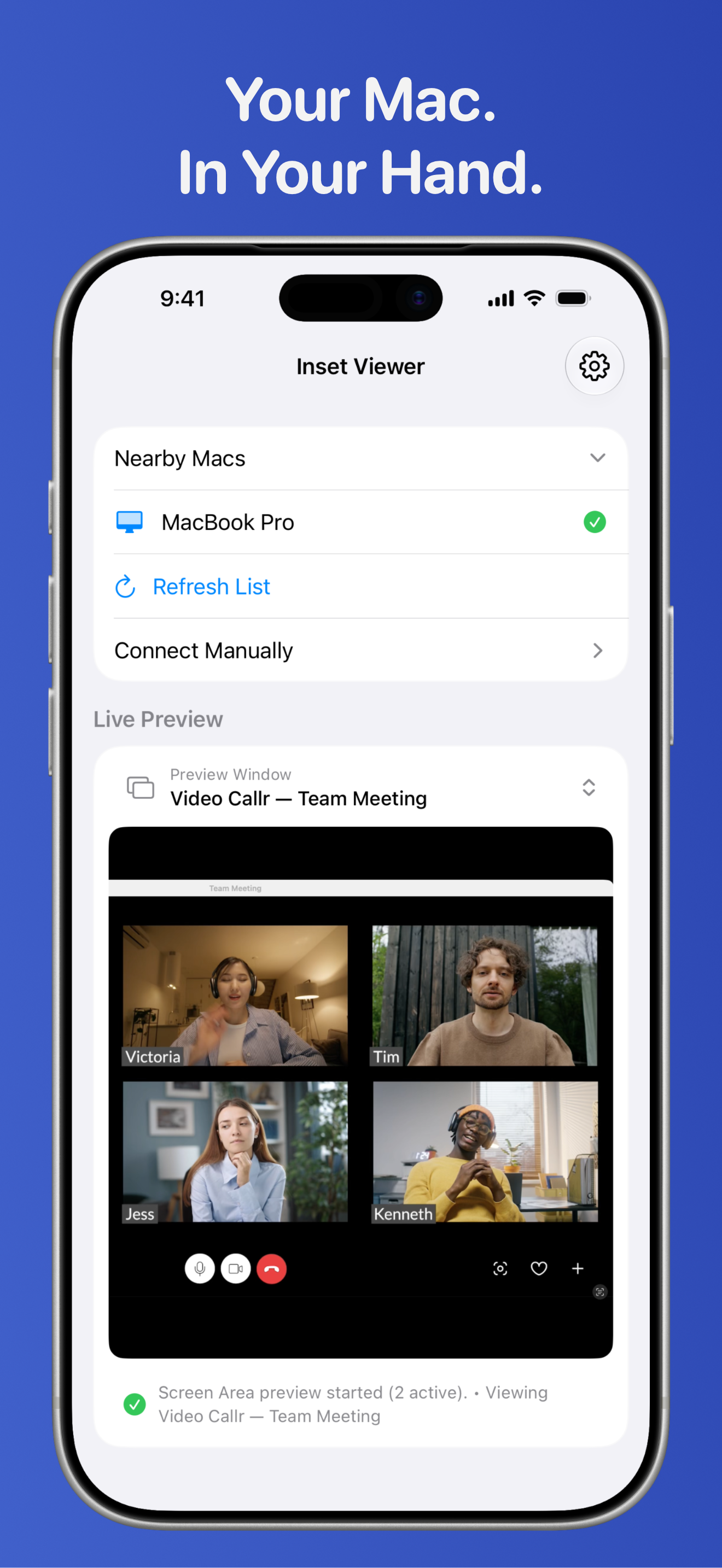
View your Mac in real time on your iPhone or iPad. Inset for iPhone and iPad connects to Inset on your Mac (all platforms for one purchase) and displays a live preview of the exact screen area or window you choose, so you can keep an eye on what matters even when you're away from your computer. MONITOR YOUR MAC REMOTELY Inset for Mac lets you select a specific window or display region like a video game, dashboard, video, or progress window. Inset for iPhone and iPad streams that live preview to your iPhone or iPad over your local Wi-Fi network. REAL-TIME SCREEN STREAMING • Live preview from your Mac • Switch between active previews • Automatic device discovery • Fast, direct connection over your local network • View your Mac in Picture in Picture on your iPhone or iPad • Mirror your Mac previews to use Inset as a teleprompter • Works with iPhone, iPad, and Apple Vision Pro (via the iPad app.) APPLE SHORTCUTS Use Apple Shortcuts to launch saved presets on your paired Mac, show your current preview in Picture in Picture, and more. GREAT FOR • Monitoring a download or build in progress • Keeping an eye on chat while live streaming • Watching a dashboard from another room • Tracking activity without constantly returning to your desk SIMPLE & PRIVATE Inset connects directly to your Mac using your local network. • No accounts • No cloud servers • No remote access outside your network • No data collection Everything stays on your devices. Requires Inset for Mac (all platform apps included under a single purchase.) Mac and iPhone/iPad must be on the same local network. Stage Manager compatibility: Screen and Screen Area previews are supported. Window and Window Area previews are not currently supported due to macOS window-capture limitations.
新機能
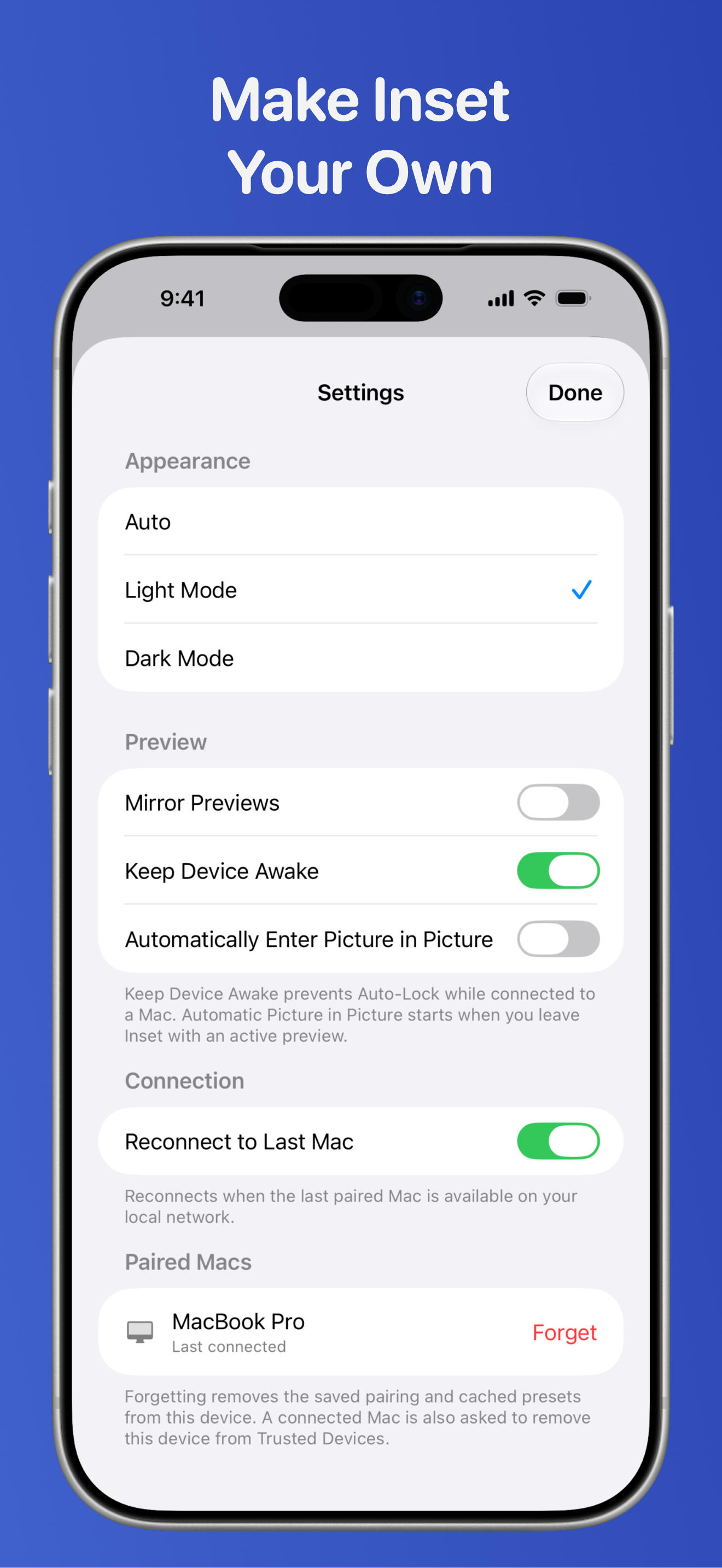
バージョン 1.2 · 2026/9/17I'm excited to bring you many new features and fixes in Inset 1.2! If you haven't used Inset in a while, give this version a whirl. New on Inset for iPhone and iPad: SETTINGS • Personalize Inset from in-app settings with Light Mode, Dark Mode, or Auto Mode, mirrored previews (use Inset as a teleprompter), and an option to keep your device awake while Inset is open. • Choose automatic Picture in Picture (your previews opens in PiP when you leave the app), automatically reconnect to your last paired Mac (on by default), and manage paired Macs for added security. APPLE SHORTCUTS & APP INTENTS • Use Apple Shortcuts to open saved presets (see below) on your paired Mac, open the active preview in Picture in Picture without going to the app first, disconnect from the paired Mac, and more! • Once you have Apple Shortcuts set up, you can launch them by just asking Siri AI or add them to your Lock Screen or Action button. New on Inset for Mac: PRESETS • Save one or more previews as a preset, including their sources, selected areas, and placement on your screen(s). So you can reopen common Inset preview setups in a couple of clicks. • Edit presets, choose how window names are matched, and repair saved sources when a window in your preset changes. APPLE SHORTCUTS & APP INTENTS • Use Apple Shortcuts to create, pause, resume, hide, or stop previews and open or stop presets. Then, ask Siri AI to run those Shortcuts for you. ◦ This is a powerful feature if used well! You can open pre-arranged floating preview windows on your screen of any of your apps or screens by just prompting Siri! ◦ On the couch, but want to see what's on your Mac in the other room? Just ask Siri AI to launch an Inset preset on your paired Mac and instantly view those app windows and/or Mac displays on your iPhone or iPad. • Many Inset options can be turned on and off via Apple Shortcuts, including Always on Top, Click-through, Opacity Control, and Hide Cursor. More automation to come in future updates! Improvements and fixes: • Nearby Macs are discovered automatically and discovery recovers after interruptions. • The pairing code field is ready to type into when the pairing screen opens. • Improved iPad pairing keyboard behavior and stability (this should fix crashes some users reported when attempting to pair on iPad, thank you for your patience!) • Added an iPhone keyboard close button when entering Mac host info for manual connections. • Fixed duplicate preview content after leaving fullscreen and improved Picture in Picture stability. • Improved connected-Mac indicators and preset selection when switching Macs. • Improved preview placeholder contrast in Light Mode. • See What's New list for Mac app for the Mac-specific list. Stage Manager supports Screen and Screen Area previews; Window and Window Area previews remain unavailable with Stage Manager because of macOS window-capture limitations.
情報
- 販売元
- Julian Gomez
- カテゴリ
- Utilities
- バージョン
- 1.2
- 対応OS
- iOS 17.6+
- サイズ
- 13.6 MB
- 年齢制限
- 4+