 AppRank
Capturas de pantalla



Descripción
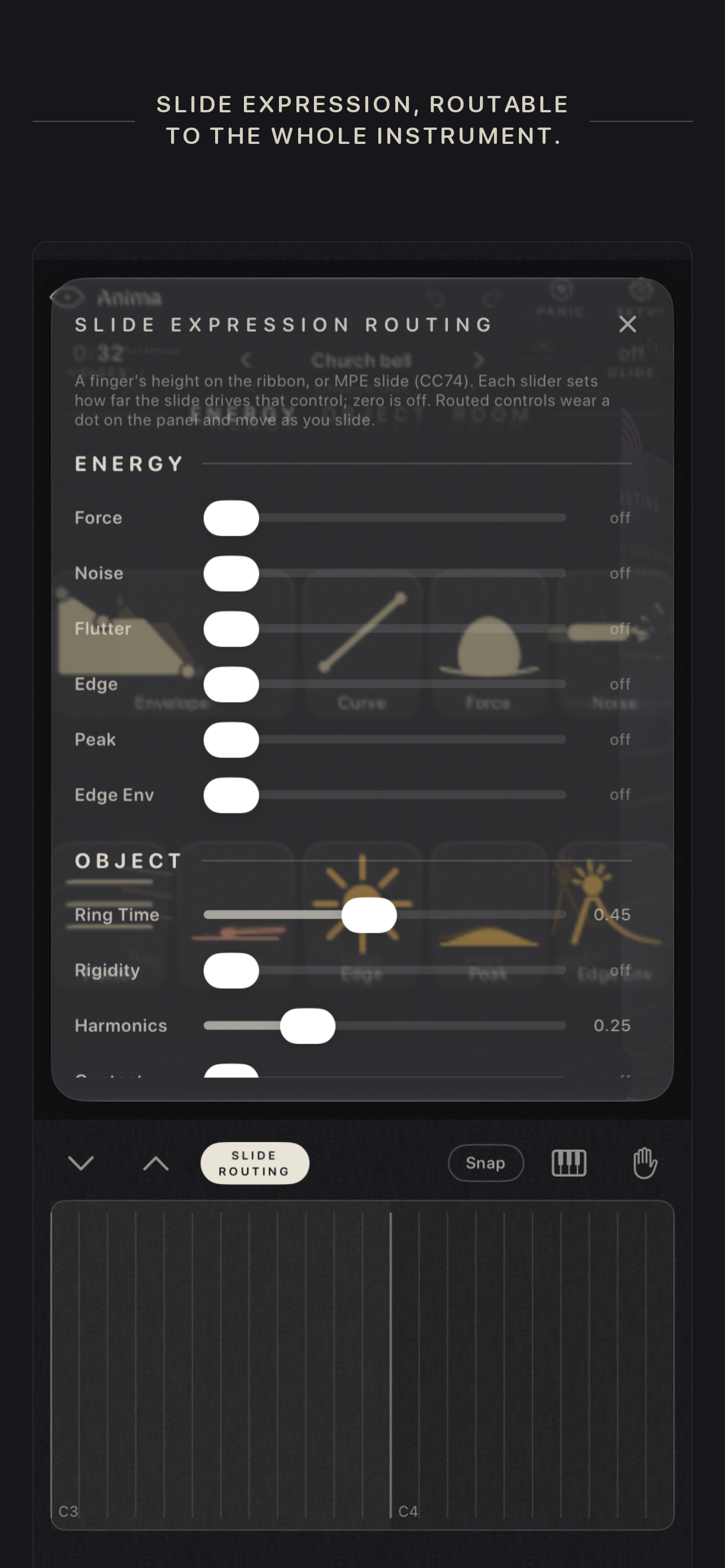
Anima is a physical modeling instrument. Sound happens the way it happens in the physical world: a breath excites an object, and the object rings out into a room. That is the whole interface, left to right: ENERGY, OBJECT, ROOM. The object is a modal resonator: twenty-four coupled resonances per voice whose frequencies, loudness, and decay follow physical laws you bend with the controls. Make it wood, glass, or metal. Stretch its partials from strings through piano wire into bells. Touch it at the edge, or hollow it out at the center. Blow at it, press it, strike it with a mallet that hits harder the higher you raise it. Push Inertia far enough and the note ignites and sings on its own breath. The controls are bold glyphs, shapes whose form is the value. No numbers at rest: the panel is a picture of the current sound, and it glides into a new shape when you load a preset. On an iPad the three sections share the screen; on an iPhone they sit side by side, a swipe apart, with the ribbon always under your fingers. Every control is easy to grasp and none of them stop at what the label says; finding what else a knob can do is part of the instrument. The ROOM is a morphable space: Size sets the echo's time, Regen goes all the way into self-oscillation, and Blur melts the repeats into a wash. Delay at one end, reverb at the other, one knob between them. Because every mode frequency is computed from the note, nothing ties Anima to the usual twelve pitches: it plays any tuning an MPE controller can send. Anima is the companion instrument to Hexatone; route Hexatone's MPE into it and per-note microtuning just works, with no configuration. - Standalone app and AUv3 instrument (AUM, Logic, GarageBand, Cubasis, Loopy Pro), on iPhone and iPad; your sound saves with the session - MPE with zero setup: per-note pressure is breath (press into a note and it can ignite), and the slide axis goes wherever you route it, any mix of the ENERGY and OBJECT controls, per note - Every control answers a fixed MIDI CC, so any hardware controller reaches the whole instrument with no mapping; pick a MIDI channel in the app, or play on all of them - Sustain pedal (CC64), MIDI Program Change, Glide, and 1 to 64 voices (at 1 it is a true mono synth) - A ribbon keyboard for true microtonal play (multitouch, per-finger glide, Hold to build chords, Snap or Loose), and a piano with properly wide black keys when you want the familiar - 55 factory presets in banks, including packs by Red Sky Lullaby and Hoavi; save your own, or copy any sound as text and send it to a friend - Undo and redo for every gesture, and the full manual lives inside the app - Collects no data; nothing leaves your device One purchase, iPhone and iPad. Headphones or a real speaker recommended: the low end of the breath is real.
Novedades
Versión 1.2 · 5/10/2026Anima 1.2 is the iPhone release. - Anima runs on iPhone now, on the same purchase. On a phone the surface shows one section at a time: tap ENERGY, OBJECT or ROOM in the header, or swipe sideways anywhere on the surface, to move between them. The top bar and the ribbon stay in place. - A fixed MIDI CC map: any controller moves every ENERGY, OBJECT and ROOM control and Glide, in the standalone and in the plugin, with no host mapping. CC 70 is Glide, 71 to 83 ENERGY, 85 to 94 OBJECT, 110 to 119 ROOM, each in panel order (74 and 84 are skipped). The manual has the table. - A MIDI channel setting for the app (SETUP ▸ MIDI ▸ Channel): Omni, the default, plays every channel as before; pick 1 to 16 and Anima hears only that channel, so the other tracks on the same connection, their CCs and program changes included, stay out. In a host, set the channel on the host's MIDI route. - Small windows page the same way: Slide Over, a short Stage Manager window or a short plugin window show one section at a time instead of a shrunken surface. - On a phone held upright the ribbon shows fewer, wider semitone frets; the octave arrows reach the rest. Keys mode fits as many octaves as the width allows. - In the plugin, PRESETS, SETUP, SLIDE ROUTING and this card no longer sit behind the ribbon drawer when the host refuses the taller window. - Naming a preset no longer resizes the surface when the keyboard appears; the keyboard covers the ribbon while you type. The launch frame is dark instead of white. - In a host, a control mapped to a MIDI controller no longer jumps back toward its previous value while you turn the controller; the glyph follows the controller. - Smaller improvements: SETUP is shorter, MIDI first, one line per setting with More in the manual links; Bend range and Pressure show only while MPE can engage. If you make something with it, I would love to hear it.
Información
- Vendedor
- Victorien Genna
- Categoría
- Music
- Versión
- 1.2
- Requiere
- iOS 17.0+
- Tamaño
- 4.0 MB
- Clasificación por edad
- 4+