 AppRank
Screenshots




Description
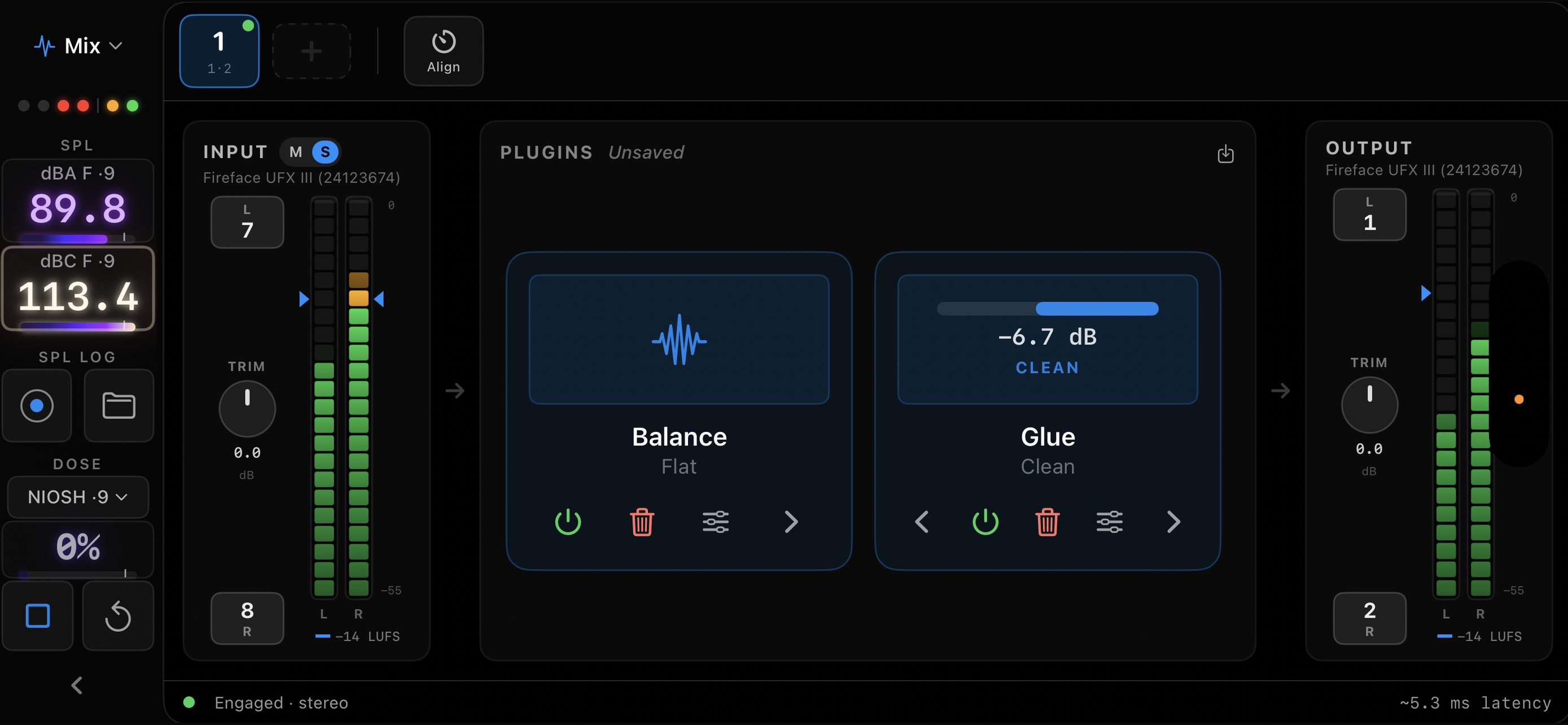
LiveSpec is the audio analyzer you can carry into any room. Point it at a stage, a sanctuary, or a stream feed and see exactly what is happening, then fix it with confidence. Whether you tune arenas for a living or run the board at church on Sunday, the tools are the same and they are all included. RUN THE SHOW Real time analyzer with sharp, smooth traces and a 3D view that shows how the spectrum moves. Spectrograph that unfolds your sound over time, so feedback and rumble have nowhere to hide. SPL monitor with A and C weighting, LAeq and LCeq, a stoplight for your limit, and logging you can export to prove how loud the night really was. Dose meter with NIOSH and OSHA standards, so you know how much safe listening time is left. Live Mix plugin host that runs Audio Unit plugins on your stream or broadcast feed, with input and output meters and LUFS targets. Mix Balance targets that give your whole team one standard to mix to, every night. Auto EQ with Smart Listen that hears the mix and suggests the correction, then lets you shape it. TUNE THE SYSTEM Transfer function with phase and coherence, so you can trust what the trace tells you. Impulse response, delay finding, and speaker alignment, with multiple microphones averaged into one picture. Decay, waterfall, RT60, and harmonic distortion views when you need to look deeper. Parametric and Graphic EQ with profiles that match the grid of popular consoles and processors, so what you design is what you can actually dial in. Signal generator with popular noise types, sweeps, and a playlist for your reference tracks. Setup wizard that finds your interface, checks your channels, and has you measuring in about a minute. MADE FOR THE JOB Works with the built in microphone or any USB audio interface, from a single mic to a full multichannel rig. Calibration files for your measurement microphones. Measurement configurations, targets, captures, and settings sync between your iPhone, iPad, and Mac through iCloud. Dark themes designed for a dim front of house position, with every panel readable at arm's length. ONE PLAN, EVERYTHING INCLUDED Start with a 7 day free trial. All Access is $17.99 per month or $149.99 per year and covers every feature on every device signed into your Apple account. No add ons, no tiers, nothing held back. Subscriptions renew automatically unless cancelled at least 24 hours before the end of the current period. Payment is charged to your Apple account, and you can manage or cancel in your account settings at any time. Privacy policy: https://linearphase.com/privacy Terms of use: https://www.apple.com/legal/internet-services/itunes/dev/stdeula/
What’s New
Version 2.1.11 · 10/6/2026LiveSpec 2.1 sharpens System Tune for real alignment work and tightens the details that matter. TRACE ALIGNMENT Pin one trace as the reference and align every other trace to it. Each delay now reads as the number to dial into that speaker, never below zero, with the distance in meters and feet beside it. Auto find only adds delay, the way a real system works, and a setting restores the symmetric search. DELAY FINDING The finder locks on the first arrival instead of the loudest reflection, so lively rooms settle faster. Input chips show each input's delay, sort shortest first, and report what the finder is doing while it searches. Track mode tracks when you switch to it mid run, Find Once and Lock lands in Manual, and an input you switch off and on again keeps the state you chose. KEYBOARD AND CHIPS Command D and Command L find or track delay on every input, Y and Command Y reset trace offsets, and Option Up and Down nudge a trace by a dB, on the Mac and on an iPad keyboard. Hover a chip on the Mac, or tap it on iPad, for levels, delay, and SPL at a glance. IMPULSE RESPONSE Traces sit on their measured arrival and the time axis reads absolute delay, with relative time still an option. The pane holds still when you stop. TARGETS AND GRID Targets sit at 0 dB on the relative axis, a 0 dB action sends the trace home on its mid band average, and custom targets open for editing in place. The 0 dB and 0 degree lines are bolder. SWEEPS Sweeps pre roll the generator and land on the reference timeline, so repeated sweeps agree on delay. SPL MONITOR Choose one to four monitor cards from the pane header. LOOK Spectrum is the default theme for new installs, and the unfolded iPhone Duo gets the iPad System Tune layout. ACCOUNT Sign in and subscription checks are hardened behind the scenes.
Information
- Seller
- Linear Phase LLC
- Category
- Music
- Version
- 2.1.11
- Requires
- iOS 17.0+
- Size
- 19.5 MB
- Age Rating
- 4+